Compare your stock with each part's reorder point and get a list of suggested purchase orders, ready to review and place.
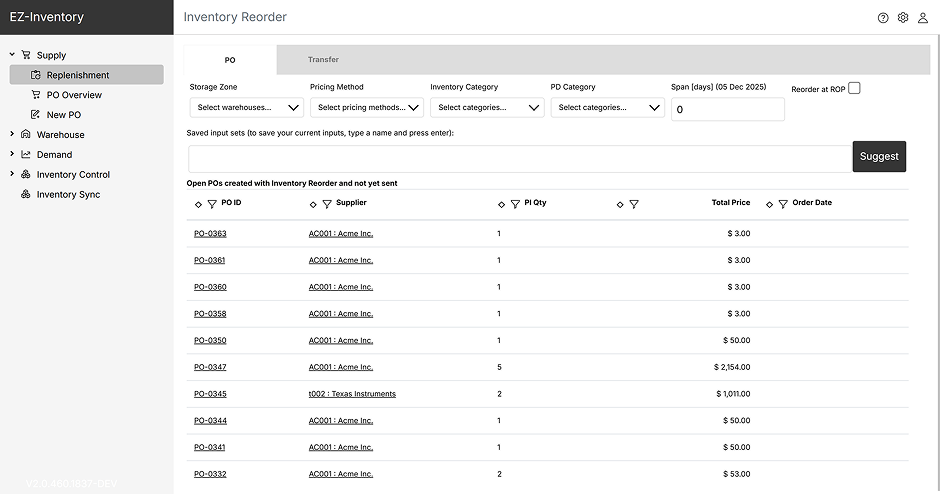
Overview
Instead of reviewing stock and open orders part by part, you run a reorder check. It compares the stock in a warehouse, the quantity already on open purchase orders and the open demand with each part's reorder point, and lists the parts that need to be ordered.
You review the suggested quantities, suppliers and dates. After you confirm, the purchase orders are created for you.
Capabilities
Run a reorder check and get the parts that need reordering, with a proposed quantity for each. If stock levels are fine, the page tells you there is nothing to reorder.
Each suggestion shows the current stock, the quantity on open purchase orders and the demand. Click a number to see the stock records, order lines or requests behind it.
Every part has its own reorder point and reorder quantity. The proposed quantity covers the shortage, rounded up to a multiple of the reorder quantity.
Select one or more warehouses. The suggestions and the purchase orders are split per warehouse.
Save your filters (warehouse, categories and the number of days to look ahead) under a name and run the same check again with one click.
If an order is larger than the part's maximum order quantity, or would push stock above its maximum stock quantity, you get a warning before the order is placed.
How it works
Step 1
Give each part a supplier, a reorder point and a reorder quantity.
Step 2
Choose the warehouses, the categories and the number of days to look ahead, or pick a saved filter set.
Step 3
Change a quantity, supplier or date, or untick a part to leave it out of this run.
Step 4
Check the order overview and confirm. The purchase orders are created and stay listed on the page until they are sent to the supplier.

