Reservations

EZ-Reservations is a real-time, browser-based reservation management system designed to create, manage, control, and optimize bookings across resources, locations, and users. Below is an overview of its core capabilities.

Reservations
Diagram

What is the Reservation Module?

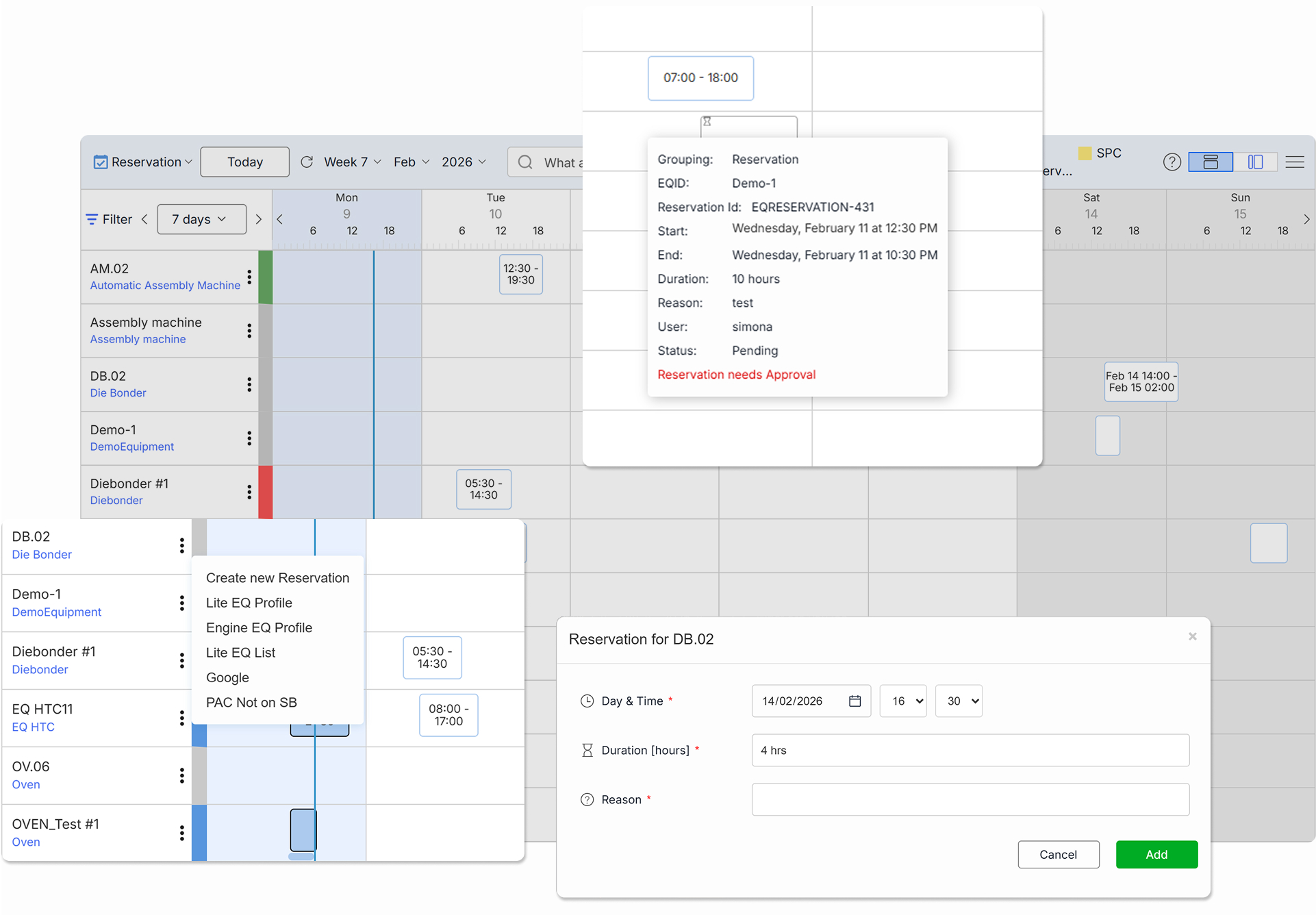
The Reservation Module in EZ-Reservations is a powerful and flexible calendar-based solution designed to manage, control, and optimize reservation workflows. It provides full visibility over bookings while ensuring structured scheduling, rule enforcement, and seamless coordination between users.With intuitive calendar views, smart filtering, and built-in approval workflows, the module helps prevent conflicts, streamline communication, and maintain complete control over reservation processes:
  • Flexible Calendar Views
  • Advanced Filtering
  • Save Filter Profiles

A Modular Architecture Built for Scale

At the foundation of Workfloor is EZ-MES, providing robust execution, tracking, and control on the factory floor. To make this power easier to use and more flexible, we introduced an intermediate layer called EZ-BRM (Business Rule Manager). EZ-BRM acts as a smart orchestration layer between EZ-MES and the Workfloor modules.
  • EZ-BRM communicates with EZ-MES through secure API calls
  • It encapsulates business logic and rules
  • It enables rapid development and customization without impacting core MES functionality
On top of EZ-BRM sits EZ-Lite, a clean, modern user interface layer. EZ-Lite delivers dedicated, role-focused GUIs for each module, ensuring that every user sees only what is relevant to their task. This layered approach allows Workfloor modules to remain lightweight, scalable, and easy to evolve as your organization grows.
Diagram

Key Capabilities of EZ-Reservations

EZ-Reservations empowers users to efficiently plan, manage, and control reservations across resources, dates, and users with a suite of intelligent scheduling and workflow features.

Flexible Reservation Rules

  • Define booking policies and usage restrictions
  • Control who can create, edit, or cancel reservations
  • Set limits based on time, resource, or user role
  • Enforce compliance with operational guidelines

Granular Time Configuration

  • Configure time slots (e.g., 15, 30, 60 minutes)
  • Adjust granularity per calendar or resource
  • Support precise scheduling requirements
  • Optimize visibility of short and long reservations

Overlap Protection

  • Automatically block overlapping bookings
  • Prevent double reservations for the same resource
  • Ensure schedule integrity in real time
  • Reduce manual conflict resolution

Email Alerts & Notifications

  • Send automatic confirmation emails
  • Notify users of approvals or rejections
  • Inform stakeholders of updates or cancellations
  • Improve communication transparency

Advanced Filtering & Saved Views

  • Filter by status, resource, user, or date range
  • Combine multiple filters for precise results
  • Save filter combinations as reusable profiles
  • Quickly switch between saved configurations

Direct Calendar Booking

  • Create reservations directly from the calendar
  • Select time slots with a simple click
  • Redirect to EZ-Lite mode for simplified booking
  • Streamline the reservation process